
How to Export X (Twitter) Bookmarks & Replies to CSV, Markdown, or Obsidian (Without Paying for the X API)
Export saved posts or profile replies from an open X tab. Save a CSV, keep a Markdown backup or import a folder of notes into Obsidian.
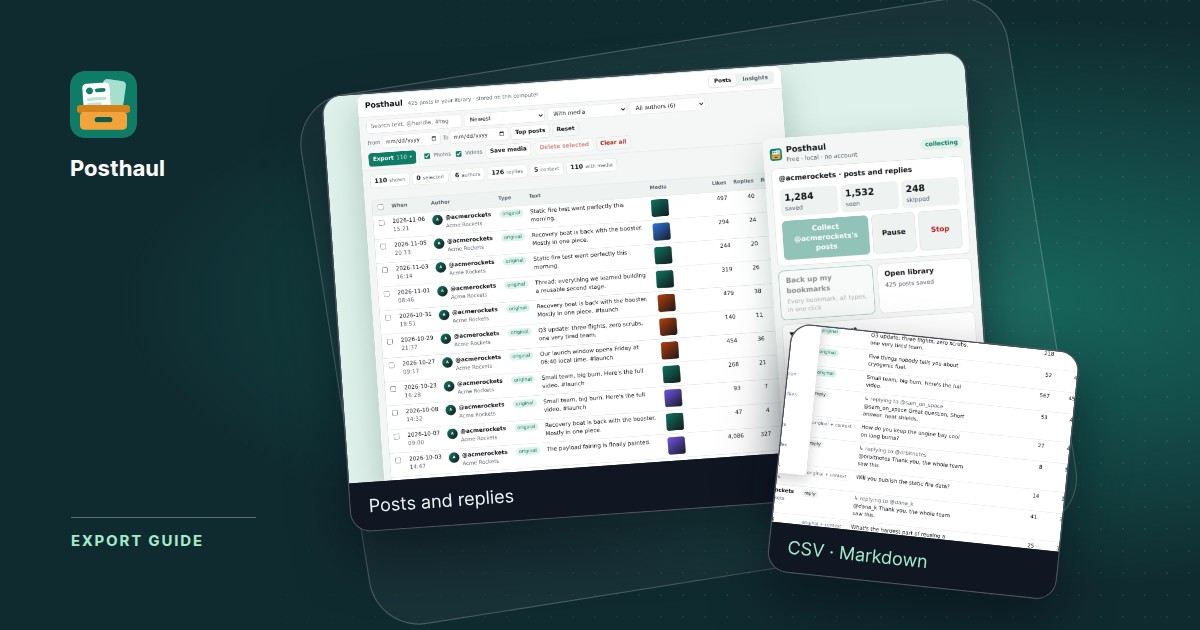
Collect the list you actually want
- In desktop Chrome, sign in to X and open Bookmarks for your saved posts, or open a profile and choose Replies for what that profile replied to. If you need the replies beneath one post, open that post’s individual thread instead.
- Click the Posthaul toolbar icon and choose Start. Keep the source tab visible while it scrolls. Start with a small run and check that the result includes the right posts. The extension can collect what X makes available to your session.
- Open the Posthaul dashboard. Select the rows you want or narrow the view with the filters. Check the count displayed by Export before saving.
Pick a format based on what you’ll do next
- CSV for sorting posts, dates or metrics in a spreadsheet. Posthaul’s CSV protects against spreadsheet formula evaluation. If you need a complete record of stored fields, save JSON as well.
- Markdown for readable notes. Put the downloaded
.mdfile in an Obsidian vault folder and open it there. Choose Threads as documents if conversation grouping is more useful than one section per post. - Notes vault (Obsidian) in Pro for one note per thread, metadata in frontmatter, an index and wiki-links. Extract the export into a vault folder and check the index before moving individual notes.
- ZIP all if you also need copies of available media. CSV and Markdown can contain media links, which can stop resolving later.
Keep a copy outside the browser
Posthaul stores a working library in IndexedDB in your Chrome profile. Export it before clearing browser data, removing the extension or moving to a new computer. Open the exported file and spot-check the newest and oldest expected records. Private, deleted or otherwise unavailable posts can be missing, and X may limit how far a list will load. Save what you can access and try again after a rate-limit pause.
Compare the workflow with synced bookmark services in Posthaul vs Dewey vs Tweetsmash.
Get Posthaul
Frequently asked questions
Do I need an X API key or a developer subscription?
No. Posthaul runs in your signed-in browser tab and collects from views you can access. X visibility and rate limits still apply.
Can I use Markdown in Obsidian without buying Pro?
Yes. Move the free Markdown file into your vault. Pro adds a structured notes vault with one note per thread and an index.
Can I include videos and photos?
Use ZIP all for available media and exports together, or Save media from the dashboard. Confirm the files are present before relying on the archive.